Beta

Real-time AWS and Kubernetes cost management, refreshed every hour

qloudpulse is a cloud cost management (FinOps) tool for AWS and for Kubernetes clusters on your own hardware. It shows what they cost in real time, refreshed every hour, what changed, and what you could change to spend less, and tells you within the hour when a cost jumps. It reads through a read-only role, or one small pod in a cluster, and never sees what is stored.

Sign up Open the demo

Free during early access. No card needed. The demo is every report on an invented company, live, with no sign-up. See pricing

  • AWS Today: every account, the bill, savings and findings.
  • On-prem Today: Kubernetes clusters on your own hardware, priced from what they cost you, and VMware vSphere on a self-hosted install, as a pilot.
  • More clouds Today: DigitalOcean, as a pilot. Next, in the order you ask for them.

Hosted by us, or self-hosted. The same product also runs in a namespace of your own Kubernetes cluster, with your data in your own database. Or hosted by us, with your data in your own AWS account. How the three compare

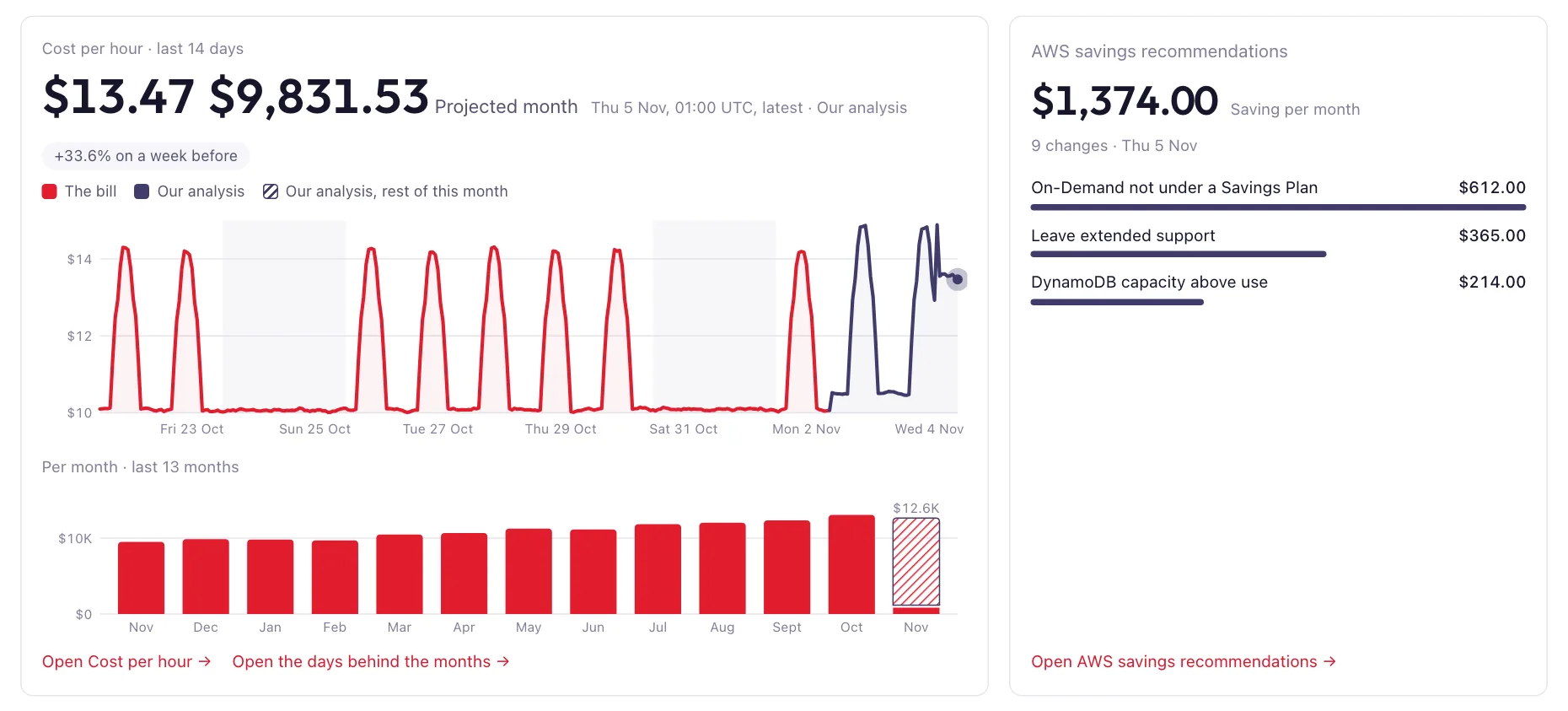
The start page of the reports: a chart of the cost per hour over the last 14 days, the cost per month over the last 13 months, and a card with the savings found so far, $1,374 a month.
The start page of the reports. Every screenshot here shows made-up data.

What it does

Reports from your accounts and clusters

qloudpulse collects from your AWS accounts and your Kubernetes clusters on a schedule and draws reports your whole team can read in a browser: what you spend, what is running, and what you could stop paying for. A cluster on your own hardware is priced from what you say a core-hour and a GiB-hour cost you. Every report, in a sentence each.

Split the way you work

Break any cost down by account, environment, service and resource, and filter to the part you care about. The link holds the view, so a colleague who opens it sees what you see. Cost allocation shows it by your own tags, such as Team or CostCenter, with the costs teams share split across them, as a showback statement per team each month.

Reports of your own

Build your own report on the same data, with no code: pick the blocks and the columns, or make a copy of any report and change it.

Budgets and unit costs

Set a monthly budget on any accounts and services, and see what is spent and where the month is heading: on track, at risk or over. Bring a number of your own, such as orders or customers, and see what each one costs in AWS, day by day or month by month, against a target if you set one.

Run it where your data should live

The same product, three ways to run it. All read your Kubernetes clusters through one small pod per cluster. Both hosted and self-hosted read your AWS accounts through read-only roles. Choose by where your cost data should live.

Hosted

We run it for you, on AWS in Ireland. Sign up, name your company and connect your AWS accounts and your clusters, on-prem included: one small pod per cluster sends its figures to us over HTTPS, and there is nothing else to install. Each company has a database of its own, kept apart from every other. Free during early access, and free afterwards up to $2,500 of AWS spend a month; above that, from $30 a month. Sign up

Hosted, in your own storage

We run it, and your data is kept in your own AWS account: an S3 bucket and an RDS Postgres database, both encrypted with a KMS key of yours. A script you run in AWS CloudShell makes them, and an admin turns it on in Settings, under Where your data is kept, where we check it and move your data across. We reach them through one role that trusts only your company, and the database answers our addresses only, over TLS. Delete the role or disable the key and our access ends, with your data still in your account. You pay AWS for the storage, about $30 a month. Read the script

Self-hosted

You run it, with one Helm chart in one namespace of your own Kubernetes cluster: no cluster-wide objects and no operator. Your cost data stays in your own database, the chart's Postgres or one you already run, sign-in goes through the install's own Keycloak, and nothing of what it collects reaches us. Each pod's network is closed apart from the paths it needs. Today it reads your Kubernetes clusters, priced from what you say a core-hour and a GiB-hour cost you, and needs no AWS account at all. It reads your AWS accounts through the same read-only roles, and your VMware vSphere through vCenter, as a pilot, which the hosted service cannot reach inside your network. A licence with the first month free, then $300 a month per install. Write to us and we set you up. More about self-hosting.

Where it fits in FinOps

In the FinOps Framework's terms, qloudpulse covers two technology categories, public cloud and data center. It reads its data from AWS, Kubernetes, VMware vSphere, DigitalOcean and Datadog, and takes the bills of Azure, Google Cloud, Oracle Cloud and any other provider as FOCUS files.

Technology categories

Public cloud

AWS: what your running resources cost each hour at list price, the settled bill from your Cost and Usage Report, savings recommendations, waste, security findings and carbon emissions, for every account you connect. Kubernetes in EKS is priced from the EC2 instances under it. DigitalOcean: each team's cost, waste and security findings. Every other cloud's bill beside AWS's, from the FOCUS files you upload.

Data center

Kubernetes clusters on your own hardware, and VMware vSphere on a self-hosted install, as a pilot. With no bill behind them, each cluster is priced from what its hardware costs you, per core-hour and GiB-hour, and every pod and VM gets its share, with the idle capacity priced apart.

Data providers

AWS

Read-only IAM roles you create yourself: the inventory, usage metrics, the public price list, and the Cost and Usage Report if you connect your bill. Hosted and self-hosted.

Kubernetes

One small pod per cluster, in EKS or on your own hardware: what each pod requests and uses, by namespace and workload, sent over outbound HTTPS. Hosted and self-hosted.

VMware vSphere Pilot

Each vCenter, read every hour with a login that holds vCenter's built-in Read-only role: hosts, VMs, datastores, snapshots and what each VM used. Each vSphere cluster is priced per core-hour, GiB-hour and GiB-month of storage. Self-hosted.

DigitalOcean

Each team, read with a read-only token: its daily costs and invoices, Droplets, volumes, databases and clusters, security findings and waste. Hosted, as a pilot.

Other clouds, through FOCUS

The bills of Azure, Google Cloud, Oracle Cloud or any other provider, as the FOCUS files they export, versions 1.0 to 1.4: uploaded by your admins and kept as each day's cost per provider, account, service and region, in the currency billed. Hosted.

Invoicing and chargeback

Chargeback splits each closed month's AWS bill by team or cost centre, with each team's share of the shared cost and the untagged cost shown apart, and gives finance a CSV statement to book. A statement is frozen once produced, and producing it again is a new, audited version.

Benefits

Cost in real time

AWS delivers the bill about a day late and keeps revising it until the month closes. The run rate does not wait: it shows what your running resources cost now, refreshed every hour, so the newest figure is never much more than an hour old.

  • Compare with 24 hours or 7 days ago, and see which resources moved.
  • It names the cause where it can, such as a fleet going from 4 to 12 instances.
  • A collection run that failed shows as a gap, never as a zero.

At AWS list price, excluding VAT. Data transfer, snapshots and request charges cannot be measured per hour, so they come from the bill if you connect it. Credits, refunds and tax are only on the bill.
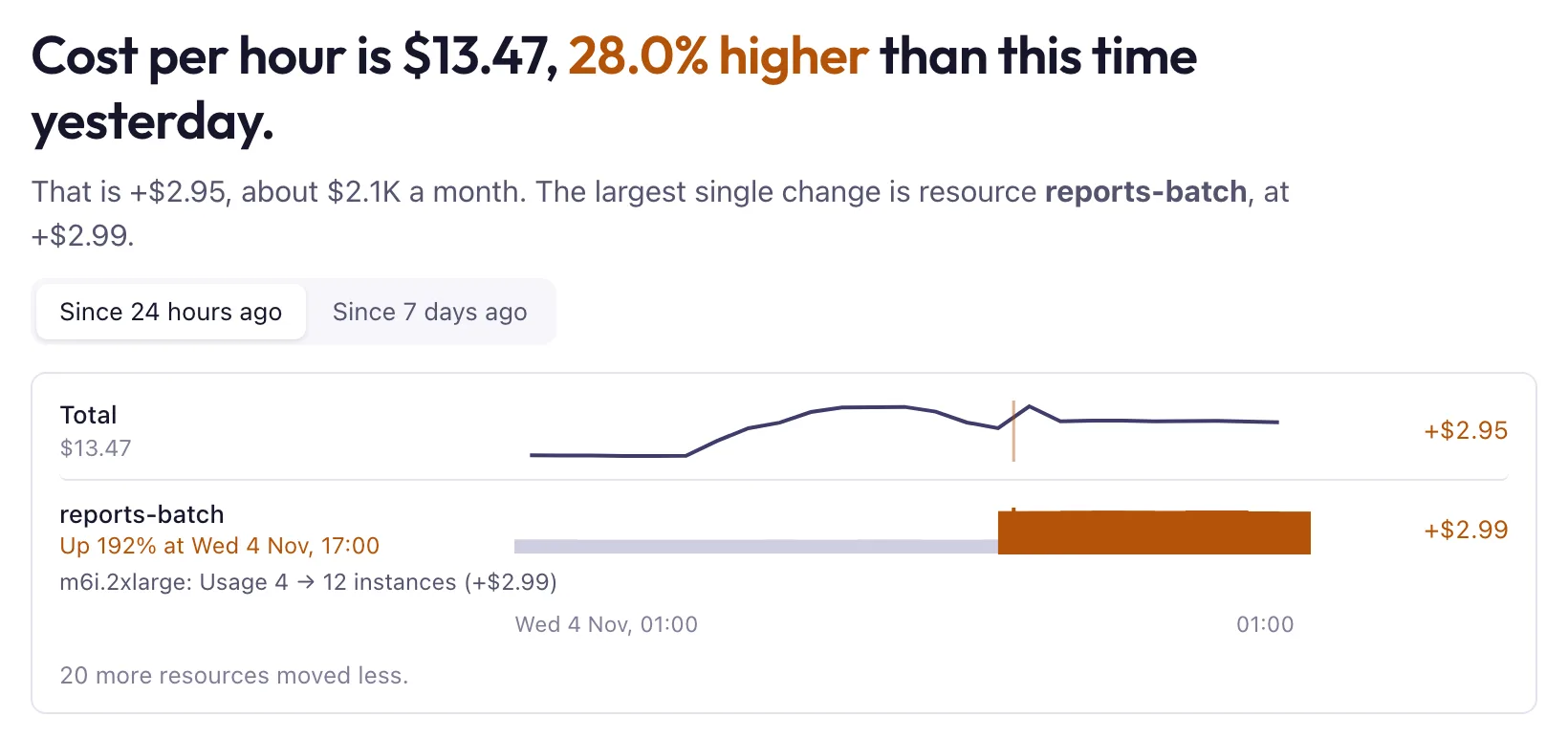
A report's headline: the cost per hour is 28% higher than this time yesterday. Below it, the resource reports-batch is marked as the largest change, with its usage going from 4 to 12 instances.

Alerts within the hour

Because qloudpulse collects every hour, it can tell you about a jump in the hour it happens. An alert that waits for the bill hears of it a day later at best, and by then a fleet that scaled out by mistake has run all night.

  • Cost jumps. When a service's cost in one of your accounts rises against the same hour a day before and a week before, an email, a Slack message or a PagerDuty alert goes out within about half an hour of that hour ending.
  • It says what moved. Each alert names the three resources that rose most, and links to the report at that hour, filtered to that service and account.
  • Read it on your phone. The link opens the report in a view made for a phone: the cost at that hour, what rose most and the filter already set, with the full report one tap away. The start page and every report have that view on a phone.
  • Budgets. When a month's spend, or where the month is heading, passes a share of its budget. The projection says on the 9th what spend would say on the 27th.
  • New security findings. Once a day, when the inventory finds something that fails a rule you chose to hear about.
  • Only what matters. A jump has to pass both your percentage and your amount, 20% and $100 a month unless you change them, so a small account's spikes stay quiet. Prefer one message a day? Take a morning digest instead.

Each person picks their own alerts and thresholds, on a page of the reports, and sends them to their own email, Slack or PagerDuty, up to five channels. A drop never alerts. Each alert is sent once, and every email has a link to stop them.

  1. 14:00The hour starts
  2. 15:10Collected and priced
  3. 15:35In your Slack and inbox

Cost alert: 1 service up $1,460 a month

The AWS run rate at 14:00 UTC on Tuesday 10 November 2026 rose past your thresholds (20% and $100 a month) on both the same hour a day before and a week before.

Amazon EC2 in production
$3,650 a month now: up $1,460 (+67%) on a day before, up $1,500 (+70%) on a week before.
Rose most: reports-batch +$1,120, api-workers +$240, etl-runner +$100

An alert as it reaches Slack, with made-up figures.

Feedback on code that agents write

Coding agents now write much of the code that changes your infrastructure, and they ship it faster than anyone can check what each change costs. An agent gets better with quick feedback, and the bill gives none for a day or more. qloudpulse collects every hour, so a change merged this morning shows in the cost by the afternoon, while the agent, or whoever reviews its work, can still act on it.

  • Each change on the chart. The pipeline that deploys sends a change event, with its commit and pull request, to one HTTPS endpoint. The cost charts mark it at the hour it landed, so a step up sits beside the change that caused it.
  • Within the hour. The run rate compares each hour with the same hour a day and a week before and names the resources that moved. When a cost jumps, an alert goes out within about half an hour.
  • Priced before it is applied. A small command reads pulumi preview --json and prints a comment for the pull request that prices the change at your own rates, from what your resources really use. The agent that opened the pull request can read it and change course before anything is applied.
  • Followed afterwards. Each change gets a reading after a day, a week and a month: what the resources it touched cost before and after it.

Pulumi previews are priced today; Terraform and OpenTofu plans follow. The whole loop, step by step.

One change, from pull request to cost

  • An agent opens a pull request
  • The pull request says what the change will cost
  • It is merged and deployed, and the pipeline sends a change event
  • The next hourly run prices what is running, with the change marked on the chart
  • A cost that jumps sends an alert within about half an hour
  • A day, a week and a month later: what the change cost

Savings recommendations

A to-do list of what to change to spend less, largest saving first, worked out again every day.

  • It finds gp2 volumes that could be gp3, unattached volumes, idle load balancers and NAT gateways, older instance generations and DynamoDB capacity above use.
  • Each kind of change says what it is, what to do, what to watch out for and how much work it takes.
  • Where one command does it, you get that command to preview and to apply. You run it: qloudpulse changes nothing.
  • Changes you have made move to a done list, with what they save.

Savings are at list price, before discounts and Savings Plans, so the bill may show less.

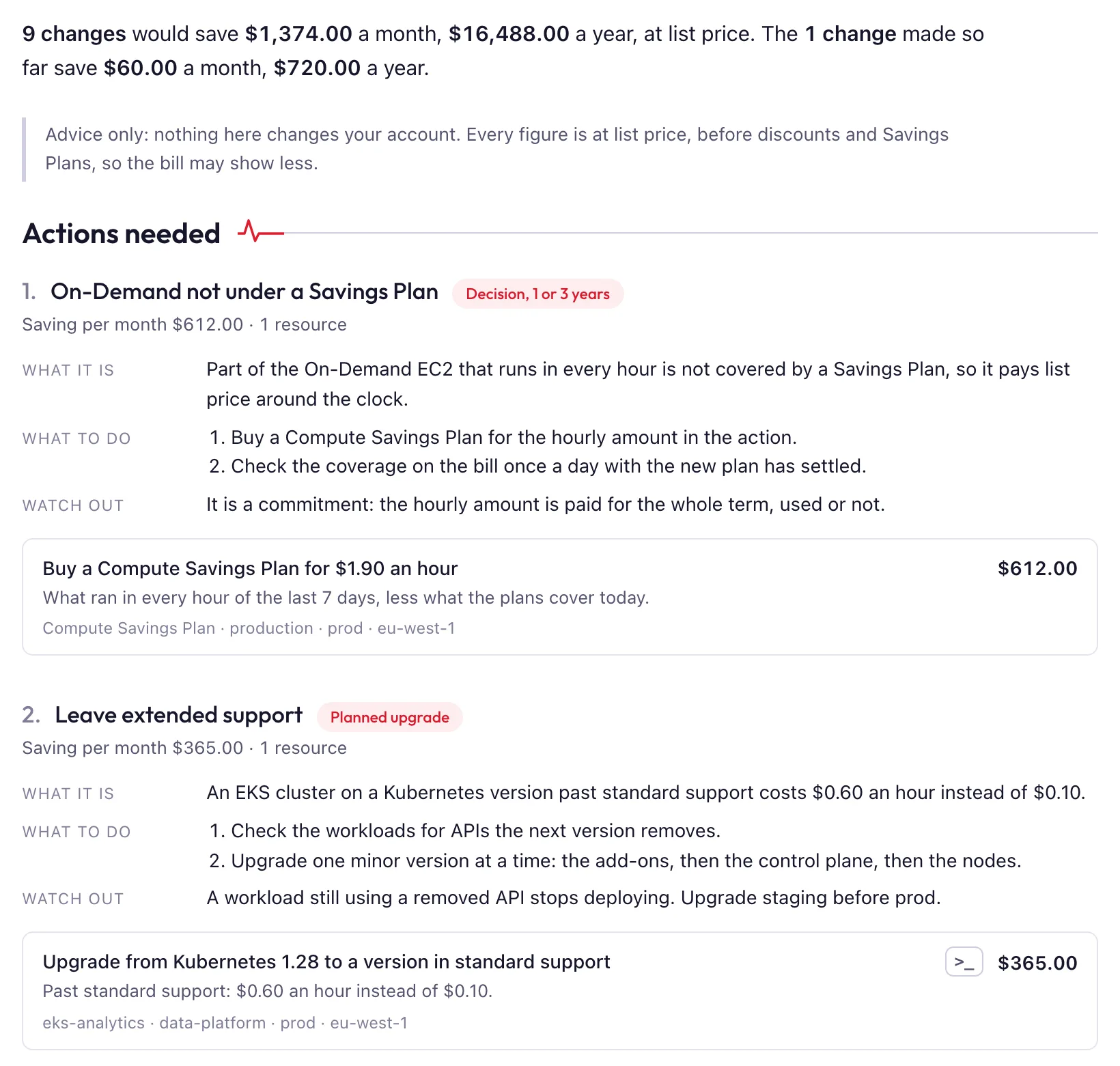
The savings report: 9 changes would save $1,374 a month. Under it, a numbered list of actions, each saying what it is, what to do and what to watch out for, with the resource and the saving per month.

Security findings, from the same read

The daily inventory that prices your accounts also sees how they are set up. It draws what anyone on the internet can reach, checks every account against a set of rules, and lists what it found as findings, severity first.

  • An internet exposure report: open ports behind an internet gateway, internet-facing load balancers, buckets public by policy, and snapshots and images shared with everyone.
  • Findings you can act on, each with what it is, where, and what to do, beside the savings in the same to-do lists.
  • No agent and no scanner: the rules run on what the read-only role already returns, so there is nothing to install and nothing extra to allow.

Findings describe your infrastructure's settings. They are not a vulnerability scan of what runs inside it.

What the rules check

  • Security groups open to the internet, and private subnets routed to an internet gateway
  • Public buckets, databases, snapshots and images
  • Volumes and databases without encryption, and without backups
  • Instances still answering IMDSv1
  • EKS clusters on old versions or with a public endpoint
  • Idle volumes and addresses, and tags missing against your tag policy
  • Instances on old or unsupported images

You decide what we build next

qloudpulse is young, and what the people using it ask for is what gets built. Asking takes a minute, from any page of the reports.

  • Ask from any page. Suggest a feature is in the top bar of every page. Say in a line what you need, and paste a screenshot if it helps to show it.
  • Hear back from the people who build it. Every request is read and answered, and you follow it in the app: received, planned, built, or not planned and why.
  • See where it stands. Your company's requests are on one page, with every answer we gave.
  • See what others asked for. We publish requests on this site, in our words and with no company named, and anyone can star them and comment, with no account. The most-starred ones are what we build next.
Suggest a feature See the requests and star what you need

Not using qloudpulse yet? Tell us what it would need to do for you: support@qloudpulse.com

How it works

Early access runs on your own AWS accounts. A new company starts with a checklist of these steps, and the first report lands within about an hour of the first account being connected.

  1. Sign up and name your company

    A login with your work email or your Google account, the address verified by a link, and your company's name. Two minutes, and no card.

  2. Add a read-only role

    You create one IAM role in each AWS account you want to include, with a script you run in AWS CloudShell. It can only read, and it trusts our collector only with an ExternalId that belongs to your company. There is no agent to install in your accounts.

  3. We collect every hour

    Each role is checked before anything is read. Then, every hour, the collector lists what is running and prices it from the public AWS price list, and reads its usage from CloudWatch once you turn usage metrics on. If you connect your bill, it reads that once a day.

  4. Read your reports

    Open them in your browser and invite your colleagues. What you see is what the last run stored: opening a page asks nothing of AWS.

Five ways to get your data in

The read-only role above is the quickest. If your company will not grant one, you can still use qloudpulse: collect the data yourself, decide what leaves, and send it.

Connected account

A read-only role made by a script in AWS CloudShell. qloudpulse reads every hour and every day: what runs, the bill, forecasts and carbon. Least effort.

Kubernetes agent

One pod per cluster from a public Helm chart. It sends out seven metrics; nothing connects in.

Offline collection New

A client you run with your own credentials. You see and redact what it found, and it delivers a bundle every hour. qloudpulse gets no access to your accounts. In early access.

FOCUS upload

The bills of Azure, Google Cloud, Oracle Cloud or any other provider, as the FOCUS files they export.

CLI in CI

qloudpulse estimate prices a Pulumi change in the pull request, before it is applied.

Compare them and choose

What we read and do not read

We read

What runs, and how much it is used.

  • What is running: EC2 instances, EBS volumes, RDS, ElastiCache, DynamoDB tables, EKS clusters, load balancers, NAT gateways and the like, with their sizes, versions and tags.
  • How much it is used: CloudWatch usage metrics.
  • How it is connected: VPCs, subnets, route tables and security groups, and whether buckets, snapshots and images are public.
  • Names and settings, never contents: S3 buckets, secrets, KMS keys, log groups and alarms, as some carry a monthly fee.
  • Your bill, if you choose to connect it, through a read-only role of its own.
  • The AWS price list, which is public and needs no access to your account.

We do not read

What is stored in it. The role denies these outright, so a broader policy attached later still could not open them.

  • Your files in S3
  • Items and rows in your databases
  • Secret values and parameters, and it cannot decrypt with your KMS keys
  • Log events
  • Stream records and queue messages
  • Instance user data, console output and passwords
  • Container images
  • Anything inside your Kubernetes clusters

And it changes nothing. The role holds read calls only. You create it yourself, so you can read every line of its policy first, and deleting it ends our access. Flow logs, if you turn them on, need a second role, which can only create and delete flow logs tagged for qloudpulse in the VPCs you choose. Every permission, statement by statement, is on its own page, with how to check them yourself: with AWS's own tools, or by asking an AI assistant.

Clouds and services

What qloudpulse reads today, and what is in work. Hosted is qloudpulse run for you; self-hosted is one Helm chart in your own Kubernetes cluster. How each one connects.

AWS

A read-only role in each account, made by a script you run in AWS CloudShell, and your bill if you connect it. Nothing is installed in your accounts, and you connect them by their ids.

Hosted and self-hosted

Kubernetes Pilot

One pod in each cluster, in EKS or anywhere else, sends what each pod requests and uses over outbound HTTPS, and reports split each node's cost across its pods. A node outside AWS is priced from what a core-hour and a GiB-hour cost you.

Hosted and self-hosted

VMware vSphere Pilot

Hosts, VMs, datastores and snapshots from each vCenter you name, every hour, with a login that holds vCenter's built-in Read-only role. Each VM is priced as its share of what its cluster costs you.

Self-hosted

Azure In work

Your Azure subscriptions read as your AWS accounts are: costs, waste and savings, from your own subscriptions.

Hosted

Google Cloud In work

Your Google Cloud projects read as your AWS accounts are: costs, waste and savings, from your own projects.

Hosted

DigitalOcean Pilot

Each DigitalOcean team read with a read-only token: its daily costs, Droplets, volumes, databases and clusters, security findings from DigitalOcean's own scans and ours, and the waste in it.

Hosted

Datadog Pilot

Your Datadog usage and bill, read with a read-only key: custom metrics nobody queries, metrics with more tags than anyone uses, and on-demand spend a commitment would cover, priced at your own contract's rates.

Hosted

What's next

qloudpulse starts with AWS, where most of the money is. What comes next is built in the order people ask for it.

Another cloud or service

Want one that is not under Clouds and services, such as Hetzner, Scaleway or a SaaS bill? Ask for it: we count every ask, build what is asked for most, and mail you once when yours is ready, if you like.

Request a cloud or service

You sign in first, so we know where to mail you. No account yet? Sign up, free, and you land on the same page.

Free early access

  • Freeduring early access
  • No cardneeded
  • 30 daysnotice before any charge

Early access is free on the hosted plan, on your own AWS accounts. It adds nothing to your AWS bill until you turn something on: the calls that list what runs are free, and what AWS charges for, usage metrics and its month forecast, is off until one of your admins turns it on, with AWS's price beside the switch. The pricing page lists them.

After early access, what you pay follows what you spend on AWS: free up to $2,500 a month, and $30 a month up to $10,000, with every feature and every AWS account included and the first month free. Or self-host it, in your own Kubernetes cluster, at $300 a month per install with the first month free. See every price.

Support is by email and best effort, and there is no uptime promise during early access.

Anyone can create a login, but during early access a company is opened only for email addresses we have listed. If you would like to try it, or have a question, write to us.